


Phone Junk Files Clear
3.915.00 Reviews
App Specs
- Version
- 1.0.0
- Updated On
- License
- Free
- Downloads
- 100,000+
- Developer
- DingBAng
- Categories
- Tools
- Platform
- Android
Screenshots
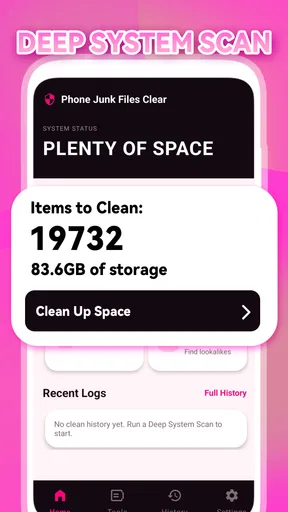
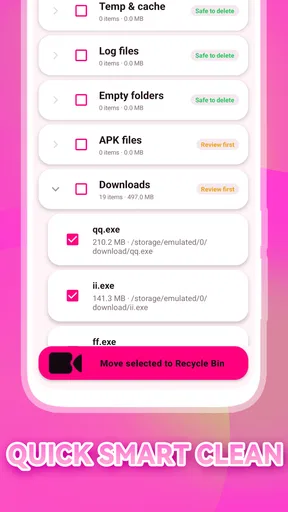
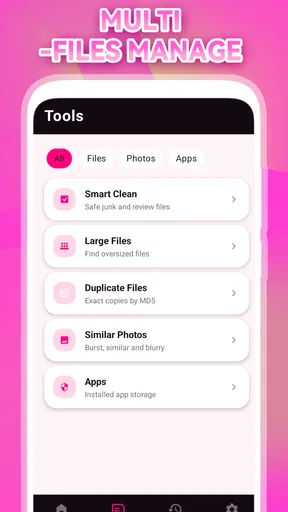
 Analysis by AppCompare
I notice the need for a phone cleaner most when a simple task turns into a storage chore: a download will not finish, a camera app complains about space, or I have to hunt through folders before saving something important. That is the kind of recurring annoyance Phone Junk Files Clear is meant to address. It is a free tools app from DingBAng, focused on clearing unwanted files rather than offering a broad suite of phone-management features.
When storage clutter gets in the way
A cleaner is useful only if it reduces effort without making me nervous about what it might remove. My standard for this kind of app is straightforward: it should make a cleanup easier to understand, help me act when space is tight, and not encourage deleting files I still need. The appeal here is the narrow purpose. Instead of treating phone maintenance as a complicated project, the app is presented as a practical way to deal with junk files.
That focus suits people who do not want to learn a large maintenance dashboard just to reclaim some room. If you tend to postpone checking storage until your phone starts interrupting you, a dedicated cleaning tool can make the task feel more approachable. I would still treat any suggested cleanup as a decision rather than a command: “junk” can sound disposable, but a file’s value depends on what you use it for.
The app’s 3.9 average from 121 ratings and its 100K+ installs suggest that people are trying it, though those figures are not a guarantee that it will suit every device or cleanup habit. It is rated for Everyone, and its current version is 1.0.0. Since it is an early, simple utility rather than a mature all-in-one toolbox, I would judge it on whether it helps with your particular storage problem, not on how many features its name might imply.
Start with a cautious first cleanup
My advice for a first run is to begin when you are not in a hurry. Open the app, review what it identifies, and pause before removing anything you do not recognize. That small habit matters more than tapping through quickly: downloaded documents, saved media, and files from messaging apps can look expendable while still being useful. A careful first pass also gives you a baseline for deciding whether the app is actually saving time.
For a practical test, clean only a category or group of files you already understand, then check that your frequently used apps and recent downloads still behave as expected. This is a better way to build confidence than clearing everything at once. If you are unsure whether a file is disposable, leave it alone and use your phone’s own file manager to inspect it. A cleaner should help narrow the task, not replace your judgment.
One useful distinction is between removing clutter and solving a deeper storage problem. A cleaner may help when temporary or unwanted files have accumulated, but it cannot create more physical capacity or make a large personal video library disappear without deleting something you value. If your biggest space users are photos, videos, offline maps, or media you intentionally keep, sorting those files yourself—or moving them to storage you control—is likely the more direct answer.
Worth Reading Before You Choose

Baby Panda World Brings Quick Play to Modern Phones, but Its Game Library Feels Busy

ESPN’s Live Game View Makes Following Close Games Easier

QuizzLand Review: A Good Fit for Short Trivia Breaks, Not Every Player

Basketball Stars: Multiplayer Is Fast, but Can It Recover When Matches Go Wrong?

WEBTOON Turns Phone Updates Into a Better Reading Routine

Link to Windows Runs on Shared Habits, Not Social Feeds
I would also treat the first session as a chance to learn how the app presents its suggestions, rather than as a race to free as much room as possible. If a group of files is unfamiliar, note the label and investigate it through the file manager before approving removal. That extra step gives you a more reliable basis for later decisions: once you recognize which kinds of clutter are genuinely disposable for your routine, future reviews can be quicker without becoming automatic.
Everyday situations where it can help
Picture getting ready to leave and trying to download a ticket or map, only to find that the phone is short on room. This is where a focused cleaner can be useful: rather than browsing every folder in search of something expendable, you can use a tool built around clearing unwanted files, then return to the task. The time saved comes from reducing the hunt, not from making every storage issue vanish automatically.
It may also suit someone who regularly receives documents and media in chat apps but rarely revisits older items. A sensible routine is to review clutter after a busy week, remove only what you recognize as no longer needed, and keep important attachments elsewhere if you rely on them. That is safer than treating a cleaning session as a monthly reset where every suggestion gets approved without inspection.
Another good use is a quick check before a trip or a long day out, when you want space for new photos, downloads, or offline content. I would do that cleanup in advance rather than while standing in a queue with limited time. The extra minute spent reviewing selections is worthwhile; an app that saves time overall should not push you into rushed deletion.
There is a small but useful planning lesson in that travel example: decide what you want to preserve before starting a cleanup. If the goal is room for new pictures, do not confuse that with a need to erase older memories; first review clearly temporary clutter, then decide whether any large personal files are safe to move or remove. Keeping the task specific helps prevent a quick maintenance session from turning into an upsetting search for something you deleted in haste.
For someone who uses a phone for work, the same care applies to downloaded forms, receipts, and attachments. A cluttered download area can be annoying, but a document that looks old may still be needed for a return, reimbursement, or appointment. I would use the cleaner to make the review less scattered, while retaining anything tied to an active task. When the file matters more than a little reclaimed room, keeping it is the sensible outcome.
Less hunting, but not a substitute for judgment
Compared with the built-in storage controls on a phone, a dedicated cleaner can feel more direct if your goal is simply to look for unnecessary files. Built-in tools, however, may be preferable when you want to understand which apps or personal files are consuming the most space, because they are part of the operating system’s own storage workflow. I would use the option that answers the actual question: removing clutter is different from diagnosing why storage is full.
Compared with manually opening folders, a cleaning app can reduce the number of places you need to check. The trade-off is that manual review gives you more context about each file. If you keep work documents, travel records, or media you cannot easily replace, that context matters. I would not choose convenience over confidence for anything that is hard to recover.
A useful non-obvious habit is to separate “I need room now” from “I want to keep this phone tidy.” In an urgent situation, remove only things you can identify with confidence; later, do a calmer review. Another is to check the result of a cleanup by trying the task that originally failed, such as saving a download. That tells you whether the app solved your real problem instead of merely making the cleanup screen look satisfying.
The usual alternatives each solve a different part of the problem. System storage settings are a better starting point when you need to identify what is taking up room across apps and personal media. A file manager is better when you want to inspect individual folders and keep close control. A dedicated cleaner makes most sense when the tedious part is locating likely clutter, and you are comfortable reviewing before acting. I see this app as a shortcut for that narrow chore, not a replacement for the other tools.
It is also worth setting a modest expectation for the result. If the phone is nearly full because of a few large games, a long video collection, or offline content you deliberately saved, clearing smaller unwanted files may not change your situation much. In that case, use storage settings to identify the main space users and make a considered choice about them. The cleaner is most valuable when the problem is scattered clutter, not when one obvious item is responsible for the shortage.
Where I would be careful
The main limitation is the nature of the category itself: a cleaner cannot know the personal importance of every file as well as you do. Even a clearly labeled unwanted item can be something you intended to keep. That is why I would avoid granting any cleaner blanket trust, and I would not use it as a replacement for a backup or for deliberate file organization.
I would also skip this kind of tool if your phone rarely runs low on space, or if you prefer to manage storage through the system settings and file manager you already use. Installing another utility for an occasional task may add more friction than it removes. Similarly, if the storage pressure comes from large apps or a growing photo collection, a file cleaner is not the first place I would look; reviewing those larger, intentional items is more likely to address the cause.
Before relying on any cleanup, I would make sure that important files exist somewhere safe outside the folders being reviewed. This is particularly worthwhile for personal documents and photos that would be difficult to replace. A cleaner can make selection easier, but it does not make accidental deletion harmless. If you do not have a backup and the file matters, the cautious choice is to leave it untouched until you have one.
Another practical question is whether the app is useful as an occasional helper or something to keep reaching for. I would answer that by watching what happens across a few real cleanups: does it help you find material you were comfortable removing, and does the original storage problem improve? If the answer is no, continuing to open it out of habit is not maintenance; it is another step in your routine. Use it when it serves a clear purpose, and let your phone’s regular storage controls handle the rest.
Phone Junk Files Clear is available free, which makes it easy to consider for someone who wants a focused place to start. Its appeal is not that it can replace careful storage habits, but that it may make a routine cleanup less of a scavenger hunt. I would approach it as a helper, inspect before deleting, and keep valuable files backed up independently.
My verdict for a practical cleanup routine
I would recommend Phone Junk Files Clear to someone who often runs into storage clutter and wants a straightforward cleaning tool rather than a more complicated phone-maintenance app. It is a better fit for quick, cautious reviews than for users expecting a complete storage diagnosis or a hands-off fix. The developer is DingBAng, and the app runs on Android devices with version 10 or later.
For me, the deciding question is whether it removes enough friction to make cleanup manageable without encouraging careless deletion. If you are willing to review what you remove, that focused approach may be useful when everyday clutter gets in the way. If you need detailed control over personal files, or your space is being used by things you deliberately keep, the built-in storage tools and a manual review are the safer choice.
In short, I would choose it for a specific, recurring nuisance: a phone that accumulates unwanted files until ordinary tasks become awkward. I would not expect it to solve every storage shortage, and I would never approve removals without checking what they mean to me. Used with that boundary, it can be a practical first stop; used as an automatic fix, it is the wrong tool for anyone who values certainty over speed.
Pros
- Quickly identifies junk files that may be taking up storage space.
- Simple controls make cleanup easy for first-time users.
- Can help free space without manually browsing every folder.
- Useful for spotting large or leftover files after app removal.
- Cleanup tools are convenient to access from one place.
Cons
- Some detected files may be useful
- so review items before deleting.
- Results can vary depending on Android version and device permissions.
- Frequent ads may interrupt cleanup on the free version.
- Cleaning junk files does not necessarily make a phone run faster.
- Background scanning may use battery while the app is active.
FAQs for Phone Junk Files Clear
What does Phone Junk Files Clear do?
Phone Junk Files Clear is designed to help identify and remove certain files that may no longer be needed, such as temporary data, cached files, or leftover files from apps. The exact cleanup options depend on the app version and your device. It should not be assumed to remove every kind of junk or noticeably speed up every phone; review what the app proposes to delete before confirming.
Is it safe to delete files with Phone Junk Files Clear?
Cleaning temporary files is generally different from deleting personal photos, messages, or documents, but the app’s permissions and selected cleanup categories matter. Read each prompt carefully and avoid deleting anything you do not recognize, especially if the tool offers broader file-management options. For important data, keep a backup. Android and iOS also restrict what third-party cleaners can access, so available features may vary by platform.
Can Phone Junk Files Clear make my phone faster or free up storage?
It may help reclaim some space if it finds removable temporary or cached files, but results depend on how much such data is present. Clearing cache can also make apps rebuild files later, and it does not guarantee better performance or longer battery life. If storage remains low, check your device’s built-in storage settings for large downloads, unused apps, and media you can safely move or remove.
Does Phone Junk Files Clear require special permissions or share my data?
A cleaner may request access to storage or other device features to scan files, and the permissions needed can differ between Android and iOS. Check the permission request in the app and the developer’s privacy policy before granting access. Do not assume that a scan is entirely private simply because it runs on your phone; verify what information, if any, is collected or shared.
Is Phone Junk Files Clear free, and are there ads or in-app purchases?
Pricing, advertising, and premium features can change by app version, region, and platform, so check the current Google Play or Apple App Store listing before downloading. Look for subscription terms, trial details, and any in-app purchase disclosures, and confirm whether the basic cleanup tools are available at no cost. If you do not want paid services, avoid starting a trial without reviewing its renewal and cancellation terms.


